CMSDAS Pre-Exercise 6: Using the grid
Overview
Teaching: 0 min
Exercises: 60 minQuestions
How do I find CMS data on the grid?
How do I run jobs on the grid with CRAB?
How do I publish and retrieve my CRAB output?
Objectives
Learn how to find CMS data on the grid
Launch a MC (Monte Carlo) generation job using CRAB
Launch a MiniAOD processing job using CRAB
Optional, but start early
This episode is not required to register for CMSDAS, but we encourage everyone to do it: any real CMS analysis uses the grid. It takes only a few hours of work, but storage requests and grid jobs can take days, so set aside about a week.
Submit your answers
Work through the Question 6.x boxes on this page, then enter all your answers in the CMSDAS@LPC2027 answer form for Episode 6. You can resubmit at any time; we keep your latest answers. Stuck? Ask on Mattermost.
Before you start
You need:
- a cmslpc account, a grid certificate, and CMS VO membership (see the setup instructions);
- write access to
T3_US_FNALLPC, i.e. your EOS area/store/user/<username>linked to your grid certificate (checked below).
lxplus users who already know CRAB can do everything at CERN instead. After CMSDAS, you can use the same steps to write to your university’s Tier 2 or Tier 3 storage.
If you get stuck, ask on Mattermost or email CMSDASATLPC@fnal.gov with a detailed description of the problem. Outside CMSDAS, see the CRAB troubleshooting twiki or the Computing Tools forum on cms-talk.
Finding data on the grid
CMS data is spread over computing sites around the world (Tier 1, 2, and 3). To find it, use the Data Aggregation Service (DAS), not to be confused with this school!
Open the DAS website (your browser needs your grid certificate; you may have to accept a security warning) and search for:
dataset dataset=/DYJetsToLL_M-50_TuneCP5_13TeV-madgraphMLM-pythia8/RunIISummer20UL18NanoAODv9-106X_upgrade2018_realistic_v16_L1v1-v1/NANOAODSIM
The first dataset says you’re searching for datasets; dataset=/DYJets... filters to this one. You should get exactly one result.

Click Files to list the files in the dataset: 71 files, mostly about 2 GB with about 2 million events each.
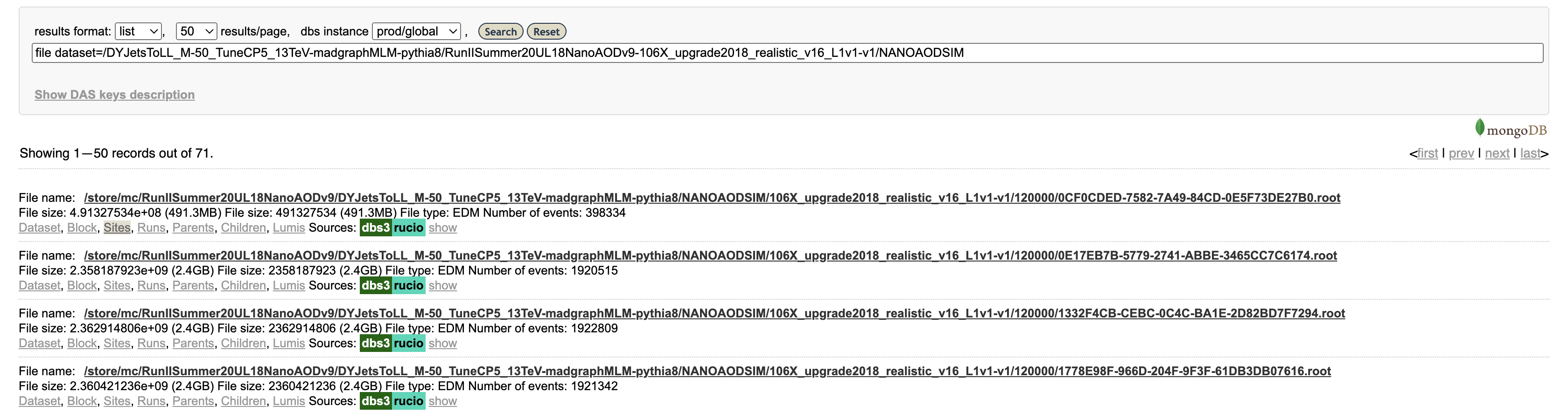
Click Sites for one file to see where it is stored, for example T1_US_FNAL_Disk, T2_US_MIT, and T2_US_Purdue. More on DAS: the DAS FAQ and WorkBookDataSamples.
Verify your grid certificate
Install your grid certificate on cmslpc-el9 too (see the setup instructions). Then log in to cmslpc-el9.fnal.gov, create a grid proxy, and inspect it:
voms-proxy-init -voms cms
voms-proxy-info -all | grep -Ei "role|subject"
The output should look like this:
subject   : /DC=ch/DC=cern/OU=Organic Units/OU=Users/CN=haweber/CN=713242/CN=Hannsjorg Weber/CN=2282089851
subject   : /DC=ch/DC=cern/OU=Organic Units/OU=Users/CN=haweber/CN=713242/CN=Hannsjorg Weber
attribute : /cms/Role=NULL/Capability=NULL
attribute : /cms/uscms/Role=NULL/Capability=NULL
No attribute : /cms/... line? Your CMS VO registration is probably incomplete; check the setup instructions, then ask on Mattermost.
Question 6.1
Enter your output of the command above in the answer form.
With a valid proxy, you can also query DAS from the command line with dasgoclient.
Question 6.2: DAS client
On cmslpc, find the number of events in a real collision dataset:
dasgoclient -query="dataset dataset=/JetHT/Run2018C-UL2018_MiniAODv2_NanoAODv9-v1/NANOAOD" -json | grep "nevents"Enter the number of events in the answer form.
Obtain a /store/user area
Your cmslpc account comes with EOS storage at /store/user/<username> (see Using EOS at LPC), and CRAB will write its output there.
But CRAB can only write there if the area is linked to your grid certificate. If you didn’t give your certificate in the cmslpc account application, file a CMS Storage Space Request. It can take up to one business day (Fermilab hours).
CRAB introduction
Downloading a whole dataset with xrdcp would quickly fill your quota. Instead, the CMS Remote Analysis Builder (CRAB) sends your CMSSW jobs to the grid, usually to CPUs at the site where the input data is stored, and copies the (much smaller) output to your /store/user area.
After this episode, we strongly recommend the full CRAB tutorial.
Set up CRAB
Set up a new CMSSW area for this exercise. CRAB comes with CMSSW: which crab should then print something like /cvmfs/cms.cern.ch/common/crab.
cd ~/nobackup/cmsdas/
scram project -n "CMSSW_13_0_13_mcgen" CMSSW_13_0_13
cd CMSSW_13_0_13_mcgen/src
cmsenv
Check that CRAB can write to your EOS area (with a valid proxy from voms-proxy-init -voms cms):
crab checkwrite --site=T3_US_FNALLPC
After a fair amount of output, it should end with:
Success: Able to write in /store/user/<username> on site T3_US_FNALLPC
Generate and publish a minimum-bias sample with CRAB
Next you’ll generate a small minimum-bias Monte Carlo (MC) sample, first locally and then on the grid.
A CMS MC job starts from a fragment, a short piece of python that configures the event generator inside CMSSW. Download a recent minimum-bias fragment:
cd $CMSSW_BASE/src
curl -s -k https://cms-pdmv-prod.web.cern.ch/mcm/public/restapi/requests/get_fragment/PPD-Run3Summer23GS-00003 --retry 3 --create-dirs -o Configuration/GenProduction/python/PPD-Run3Summer23GS-00003-fragment.py
Show the fragment
It sets up a module that runs Pythia inside CMSSW, plus Pythia settings:
import FWCore.ParameterSet.Config as cms

from Configuration.Generator.Pythia8CommonSettings_cfi import *
from Configuration.Generator.MCTunesRun3ECM13p6TeV.PythiaCP5Settings_cfi import *

generator = cms.EDFilter("Pythia8ConcurrentGeneratorFilter",
    maxEventsToPrint = cms.untracked.int32(1),
    pythiaPylistVerbosity = cms.untracked.int32(1),
    filterEfficiency = cms.untracked.double(1.0),
    pythiaHepMCVerbosity = cms.untracked.bool(False),
    comEnergy = cms.double(13600.),
    PythiaParameters = cms.PSet(
        pythia8CommonSettingsBlock,
        pythia8CP5SettingsBlock,
        processParameters = cms.vstring(
              'SoftQCD:inelastic = on'
       ),
        parameterSets = cms.vstring('pythia8CommonSettings',
                                    'pythia8CP5Settings',
                                    'processParameters',
                                    )
    )
)
Turn the fragment into a full CMSSW configuration with cmsDriver.py. (scram b first, so CMSSW knows about the new file.)
cd $CMSSW_BASE/src
scram b
cmsDriver.py Configuration/GenProduction/python/PPD-Run3Summer23GS-00003-fragment.py --python_filename cmsdas_minbias_cfg.py --eventcontent NANOAODGEN --step GEN,NANOGEN --datatier NANOAODSIM --customise Configuration/DataProcessing/Utils.addMonitoring --fileout file:cmsdas_minbias_nanogen.root --conditions 130X_mcRun3_2023_realistic_forMB_v1 --beamspot Realistic25ns13p6TeVEarly2023Collision --geometry DB:Extended --era Run3_2023 --no_exec --mc -n 20
This writes cmsdas_minbias_cfg.py; skim it to see how much cmsDriver.py wrote for you.
The job generates 20 events with Pythia (the GEN step) and saves the generated particles to a NanoAOD file (NANOGEN), skipping detector simulation to keep things fast.
Test locally
Always test a few events locally before sending jobs to the grid. This takes a few minutes and prints a lot of Pythia output:
cmsRun cmsdas_minbias_cfg.py
Question 6.3
What is the size of the output file
cmsdas_minbias_nanogen.root? Usels -lh, and enter it in the answer form.
Submit to CRAB
CRAB is configured with (once again!) a python file; see CRAB3ConfigurationFile for all the options. Download our config and submit it:
cd $CMSSW_BASE/src
wget fnallpc.github.io/cms-das-pre-exercises/code/cmsdas_mc_crab.py
crab submit -c cmsdas_mc_crab.py
Show the CRAB config
It runs 10 jobs of 20 events each and publishes the output as a dataset:
from WMCore.Configuration import Configuration
config = Configuration()

config.section_("General")
config.General.requestName = 'cmsdas_minbias_test0'
config.General.workArea = 'crabsubmit'

config.section_("JobType")
config.JobType.pluginName = 'PrivateMC'
config.JobType.psetName = 'cmsdas_minbias_cfg.py'
config.JobType.allowUndistributedCMSSW = True

config.section_("Data")
config.Data.outputPrimaryDataset = 'MinBias'
config.Data.splitting = 'EventBased'
config.Data.unitsPerJob = 20
NJOBS = 10  # This is not a configuration parameter, but an auxiliary variable that we use in the next line.
config.Data.totalUnits = config.Data.unitsPerJob * NJOBS
config.Data.publication = True
config.Data.outputDatasetTag = 'MinBias_TuneCP5_13p6TeV-pythia8_cmsdas2025_test0'

config.section_("Site")
config.Site.storageSite = 'T3_US_FNALLPC'
You may be asked for your grid certificate password. A successful submission ends with:
Success: Your task has been delivered to the prod CRAB3 server.
Task name: 231110_212908:<username>_crab_cmsdas_minbias_test0
Project dir: crabsubmit/crab_cmsdas_minbias_test0
Please use ' crab status -d crabsubmit/crab_cmsdas_minbias_test0 ' to check how the submission process proceeds.
Don’t delete the project directory
crabsubmit/crab_cmsdas_minbias_test0holds everything CRAB needs to manage your task. Jobs sometimes fail (site problems, network errors, …) and can be retried withcrab resubmit -d <project dir>, but only if the directory still exists. Don’t modify or delete it until the task is completely finished.
Monitor the task
Check the status of your task (see CRAB commands for others):
crab status -d crabsubmit/crab_cmsdas_minbias_test0
This shows how many jobs are in each state (idle, running, transferring, finished, failed, …) and links to monitoring web pages. Jobs usually take a few hours; take a break and check back. When the task is done, the output looks like this (abridged):
Status on the scheduler:    COMPLETED

Jobs status:                    finished            100.0% (10/10)

Publication status of 1 dataset(s):  done           100.0% (10/10)

Output dataset:         /MinBias/<username>-MinBias_TuneCP5_13p6TeV-pythia8_cmsdas2025_test0-<hash>/USER
Output dataset DAS URL: https://cmsweb.cern.ch/das/request?input=...&instance=prod%2Fphys03
...
The output files are in your EOS area, e.g. eosls /store/user/<username>/MinBias/MinBias_TuneCP5_13p6TeV-pythia8_cmsdas2025_test0/.
The Output dataset line is the name of your published dataset: congratulations, your first CMS dataset!
Note that CRAB gives each job its own random-number seed. Running cmsRun cmsdas_minbias_cfg.py ten times yourself would give ten identical files.
Question 6.4
Enter the name of the dataset you published in the answer form.
Processing MiniAOD with CRAB
Now run the ZPeakAnalyzer from Episode 5 on real data with CRAB. It uses the Episode 5 release, so log out, log back in, and set it up:
cd ~/nobackup/cmsdas/CMSSW_13_0_10_cmsdas/src
cmsenv
wget fnallpc.github.io/cms-das-pre-exercises/code/cmsdas_zpeak_crab.py
Show the CRAB config
import os
from WMCore.Configuration import Configuration
config = Configuration()

config.section_("General")
config.General.requestName = 'cmsdas_zpeak_test0'
config.General.workArea = 'crabsubmit'

config.section_("JobType")
config.JobType.pluginName = 'Analysis'
config.JobType.psetName = os.path.expandvars('$CMSSW_BASE/src/MyAnalysis/LearnCMSSW/test/zpeak_cfg.py')
config.JobType.allowUndistributedCMSSW = True

config.section_("Data")
config.Data.inputDataset = '/DoubleMuon/Run2016C-03Feb2017-v1/MINIAOD'
config.Data.inputDBS = 'global'
config.Data.splitting = 'LumiBased'
config.Data.unitsPerJob = 50
config.Data.lumiMask = 'https://cms-service-dqmdc.web.cern.ch/CAF/certification/Collisions16/13TeV/Cert_271036-275783_13TeV_PromptReco_Collisions16_JSON.txt'
config.Data.runRange = '275776-275782'

config.section_("Site")
config.Site.storageSite = 'T3_US_FNALLPC'
Compared with the MC config, two settings are new:
runRangeprocesses only a few runs, to save time and CO2;lumiMasklists the runs and lumisections certified as good for analysis. Each detector group marks data as bad when it had problems, for example a wrong HCAL photomultiplier voltage.
Submit the task and check on it as before:
crab submit -c cmsdas_zpeak_crab.py
crab status -d crabsubmit/crab_cmsdas_zpeak_test0
Once all jobs are finished, print a summary of what was processed:
crab report -d crabsubmit/crab_cmsdas_zpeak_test0
Summary from jobs in status 'finished':
  Number of files processed: 64
  Number of events read: 2167324
  ...
Question 6.5
How many events were read? Enter the number from your
crab reportin the answer form.
Optional: View the Z peak from the combined data
CRAB processed far more events than your local job in Episode 5. Combine the histograms from all output files with
hadd. First find your output folder, which is named after the task’s submission time:eosls /store/user/<username>/DoubleMuon/crab_cmsdas_zpeak_test0/Then list the files with
xrdfsand pass them all tohadd:DIR=/store/user/<username>/DoubleMuon/crab_cmsdas_zpeak_test0/<timestamp>/0000 hadd ZPeak.root $(xrdfs root://cmseos.fnal.gov ls $DIR | grep ZPeak | sed 's|^|root://cmseos.fnal.gov/|')Open
ZPeak.rootand plotzpeak_analyzer/dimuonMassas in Episode 5: there should be many more events. Tip: keep merged files below about 5 GB; many filesystems and networks handle larger files poorly.
Where to find more on CRAB
- CRAB home and CRAB FAQ
- CRAB troubleshooting guide: how to fix common problems and ask for support
- Computing Tools forum on cms-talk: ask for help with job problems (include the task’s HELP URL from
crab status), and follow CRAB and grid announcements
Last reviewed: 2024/10/28 by David Yu
Key Points
CMS data is stored around the world at various T1, T2, and T3 computing sites.
Use the Data Aggregation Service (DAS) to search for CMS data.
The CMS Remote Analysis Builder (CRAB) utility lets you launch jobs on the CMS grid.
Grid jobs run around the world, typically (but not always) using CPUs at the same site as the data.